
Download Axerve APK – Business Tool, Payment Management, POS, Mobile Payments, Free Android App
Overview
Axerve is a free Android application developed by BancaSella, designed to support small and medium-sized business owners in managing their commercial activities more efficiently. The app serves as a digital control panel for business operations, enabling real-time access to transaction data collected through point-of-sale (POS) systems and mobile payment methods. Its primary function is to streamline financial oversight by providing immediate insights into daily sales performance, payment trends, and business activity metrics. This makes it particularly useful for retail shops, service providers, and kiosk-based businesses that rely on quick, smartphone-based payments.
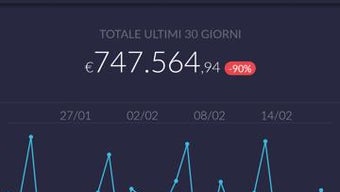
Users can monitor transaction progress in real time, analyze historical data across different time periods, and visualize key performance indicators through interactive graphs. The app aims to simplify business decision-making by transforming raw transaction data into clear, actionable insights. While the developer did not provide additional details about the target user base beyond business owners, the interface appears optimized for non-technical users seeking intuitive access to financial analytics. The tool is especially beneficial for entrepreneurs who need to track turnover, compare daily or weekly performance, and adjust their strategies based on up-to-date information.
Key Features & Capabilities
- Real-Time Transaction Monitoring – Access live updates on all transactions processed through POS and mobile payment systems, allowing immediate awareness of ongoing sales activity.
- Automated Transaction Analysis – The app performs automatic analysis of payment data, delivering insights without requiring manual data processing.
- Performance Comparison Tools – Compare business performance across different days, weeks, or months using built-in period-over-period analysis.
- Data Visualization via Graphs – View sales trends and revenue progression through clear, interactive charts that simplify complex data interpretation.
- Mobile Payment Integration – Facilitate payments from customers using smartphones, enhancing checkout speed and convenience.
- Remote Business Control – Access the control panel from any location with an internet connection, enabling management from outside the physical store.
These features collectively support business owners in tracking revenue streams, identifying peak sales periods, and making informed operational decisions. For instance, a café owner could use the app to compare weekend versus weekday sales, adjust staffing schedules, or evaluate the impact of promotional campaigns. Similarly, a boutique retailer might leverage the graphing functionality to assess seasonal trends and optimize inventory ordering. The app’s focus on accessibility and real-time data ensures that users remain in control of their business performance at all times.
User Interface, Workflow & Performance
The user interface of Axerve is structured around a clean, intuitive dashboard that prioritizes readability and ease of navigation. Key metrics such as total sales, active transactions, and recent payments are displayed prominently, enabling quick assessments of current business health. Navigation is streamlined through a bottom menu bar, allowing users to switch between sections like “Overview,” “Transactions,” “Graphs,” and “Settings” with minimal effort.
Workflow efficiency is enhanced by the app’s ability to load and display data in real time, reducing delays in accessing critical information. The design emphasizes simplicity, minimizing the need for user training or technical expertise. While the developer did not specify resource usage details, general software behavior suggests efficient memory and CPU utilization, typical of lightweight Android applications focused on data presentation rather than heavy computation.
Stability appears to be a priority, as the app is designed for continuous use in commercial environments. However, exact performance metrics such as load times, battery consumption, or background behavior were not provided. Users can expect consistent access to data as long as the device maintains a stable internet connection. The app’s reliance on cloud-based data synchronization means performance may vary slightly depending on network conditions.
Compatibility & System Requirements
Axerve is designed for Android devices and is available as an APK file for direct installation. The app is compatible with Android operating systems, though the specific version requirements were not listed. Installation size is not specified, but given its nature as a data visualization and analytics tool, it likely occupies a moderate amount of storage space.
Exact system requirements were not listed by the developer. This includes details about minimum RAM, processor architecture, or screen resolution. As such, users should ensure their device meets general Android compatibility standards for running third-party business applications. The app may require a stable internet connection for full functionality, particularly for real-time data syncing and remote access to the control panel.
Pros and Cons
Pros
- Free to download and use, making it accessible for small business owners with limited budgets.
- Real-time transaction monitoring enhances responsiveness to business activity.
- Intuitive interface designed for non-technical users.
- Visual data representation through graphs simplifies performance analysis.
- Remote access to business data enables management from anywhere.
- Supports mobile payment integration, improving customer checkout experience.
Cons
- Exact system requirements were not provided, limiting compatibility verification.
- Limited information about offline functionality or data caching.
- Performance under poor network conditions may affect usability.
- Only available for Android, restricting access for iOS users.
- No details on update frequency or long-term support plans.
FAQ Section
Is Axerve available for iOS devices?
As of now, Axerve is only available for Android. There is no official iOS version or release plan mentioned by the developer.
Can I use Axerve without an internet connection?
The app requires a stable internet connection for real-time data updates and remote access to the control panel. Offline functionality or local data storage was not specified.
Is Axerve safe to download and install?
Axerve is developed by BancaSella, a recognized financial institution. The APK file should be downloaded from official or trusted sources to ensure security and integrity.
How often does Axerve receive updates?
Update frequency was not disclosed by the developer. Users are advised to check the official source regularly for new versions.
What type of license does Axerve use?
Axerve is offered as a free tool with no explicit licensing terms provided. It is intended for personal and commercial use by business owners.
Final Thoughts + CTA
Axerve presents a practical solution for small and medium-sized businesses seeking to monitor and improve their daily operations through digital tools. With its real-time transaction tracking, automated analysis, and visual reporting, the app empowers entrepreneurs to make data-driven decisions without needing advanced technical skills. While limitations such as restricted platform availability and lack of detailed system requirements exist, the app’s core functionality remains robust and relevant.
Business owners who rely on mobile payments and need immediate access to sales data will find Axerve particularly valuable. Its free nature and straightforward interface make it a compelling choice for startups and independent retailers looking to enhance their operational visibility.
Download Axerve now to manage your business activity with ease.





.png)

